НМТ підготовка





Join the Goat Team
We are looking for someone to join our team as a Newspaper Admin and Production Assistant on a part-time basis, 1-2 days per week. Monday and Tuesday, 9 AM-1PM. We are looking for someone who has:
* experience with Quickbooks and Indesign (prefered but not necessary - we will train)
* a realible vehicle
* willingness to be a part of dynamic team and do what it takes to get a newspaper out the door each week!
This advertisement is for people who would like to _________
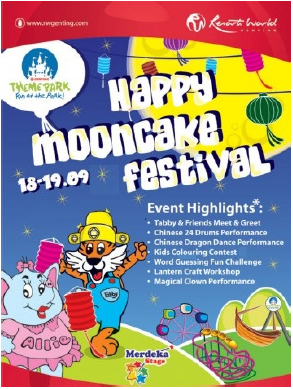
HAPPY MOONCAKE FESTIVAL
18-19.09
Event Highlights:
* Tobby &friends Meet& Greet
* Chinese 24 Drams Performance
* Chinese Dragon Dance Performance
* Kids Colouring Contest
* Word Guessing Fun Challenge
* Lantern Craft Workshop
* Magical Clown Performance
This advertisement is for people who would like to ______________.

THIS IS ME NOW
New moves. New foods. New habits. We`ve got ideas to get you started today. get help and support at nhs.uk/Better Health
This advertisement is for people who would like to ______________.

BEST CAR RENTAL IN TOWN!
* Affordable Rates
* Cash Payment welcome
* No Credit or Insurance Needed
* Unlimited Miles
* Wide RAnge of Cars Available
RENT 6 DAYS GET 1 DAY FREE
BOOK NOW

WHAT TO EXPECT AT
GLOBAL PET EXPO
Areyou get nearby to travel to the expo, here are the key things to expect next week t the expo:
* A look at the latest pet products and trends
* An opportunity to network, reconnect and spend time with collegues and friends
* All new digital expo planning tools at your disposal
This advertisement is for people who would like to ______________.
EMOJIS
92% of Internet users understand this language - but it’s not English, Japanese or any other common language you might think of! It’s emoji - the digital language that is taking the world by storm! Emojis are small digital images - sometimes animated - that people use to communicate online or in text messages. The most common emojis are facial expressions to show how somebody is feeling, but there are also emojis for animals, buildings, weather conditions and much more!
In the early 90s, many people used punctuation marks and letters in digital conversations. For example, a colon followed by a bracket makes a smiley face :). People used these icons for fun and also to add a tone to their digital conversations. When we speak, we can hear the tone in people’s voices – but we lose tone in the digital world - and that sometimes causes confusion! For example, ‘Thanks a lot’ could have a friendly or an angry tone, but adding >:( makes the tone more obvious! The problem was, though, that these symbols were very limited and often unclear.
So, in the late 90s, a Japanese mobile phone company got the idea to create clear digital icons for use on their phones.
A programmer with the company, Shigetaka Kurita, created the first 176 emojis and they were hugely popular. Soon, other mobile phone companies created their own emojis. Now, emojis are an important part of our daily communication. According to a recent study, Americans send an average of 96 emojis a day and 76% of Americans use emojis daily at work!
Today, there are thousands of emojis for us to use and it’s common to see digital messages with more emojis than actual words! In fact, volunteers have even translated Moby Dick into Moji Dick - an emoji version of the novel! Also, many companies have started to use emojis to advertise their products. All this could have a big effect on worldwide communication. Since emojis are based on pictures, they are universal - people with different languages can understand them easily.
It seems that emojis are here to stay. With people and companies all over the world using them every day, emojis are now the fastest growing language in the world. So who knows? Maybe emoji could become the world’s first international language.
The most popular emojis show___________
EMOJIS
92% of Internet users understand this language - but it’s not English, Japanese or any other common language you might think of! It’s emoji - the digital language that is taking the world by storm! Emojis are small digital images - sometimes animated - that people use to communicate online or in text messages. The most common emojis are facial expressions to show how somebody is feeling, but there are also emojis for animals, buildings, weather conditions and much more!
In the early 90s, many people used punctuation marks and letters in digital conversations. For example, a colon followed by a bracket makes a smiley face :). People used these icons for fun and also to add a tone to their digital conversations. When we speak, we can hear the tone in people’s voices – but we lose tone in the digital world - and that sometimes causes confusion! For example, ‘Thanks a lot’ could have a friendly or an angry tone, but adding >:( makes the tone more obvious! The problem was, though, that these symbols were very limited and often unclear.
So, in the late 90s, a Japanese mobile phone company got the idea to create clear digital icons for use on their phones.
A programmer with the company, Shigetaka Kurita, created the first 176 emojis and they were hugely popular. Soon, other mobile phone companies created their own emojis. Now, emojis are an important part of our daily communication. According to a recent study, Americans send an average of 96 emojis a day and 76% of Americans use emojis daily at work!
Today, there are thousands of emojis for us to use and it’s common to see digital messages with more emojis than actual words! In fact, volunteers have even translated Moby Dick into Moji Dick - an emoji version of the novel! Also, many companies have started to use emojis to advertise their products. All this could have a big effect on worldwide communication. Since emojis are based on pictures, they are universal - people with different languages can understand them easily.
It seems that emojis are here to stay. With people and companies all over the world using them every day, emojis are now the fastest growing language in the world. So who knows? Maybe emoji could become the world’s first international language.
Around how many emojis do Americans use each day?
EMOJIS
92% of Internet users understand this language - but it’s not English, Japanese or any other common language you might think of! It’s emoji - the digital language that is taking the world by storm! Emojis are small digital images - sometimes animated - that people use to communicate online or in text messages. The most common emojis are facial expressions to show how somebody is feeling, but there are also emojis for animals, buildings, weather conditions and much more!
In the early 90s, many people used punctuation marks and letters in digital conversations. For example, a colon followed by a bracket makes a smiley face :). People used these icons for fun and also to add a tone to their digital conversations. When we speak, we can hear the tone in people’s voices – but we lose tone in the digital world - and that sometimes causes confusion! For example, ‘Thanks a lot’ could have a friendly or an angry tone, but adding >:( makes the tone more obvious! The problem was, though, that these symbols were very limited and often unclear.
So, in the late 90s, a Japanese mobile phone company got the idea to create clear digital icons for use on their phones.
A programmer with the company, Shigetaka Kurita, created the first 176 emojis and they were hugely popular. Soon, other mobile phone companies created their own emojis. Now, emojis are an important part of our daily communication. According to a recent study, Americans send an average of 96 emojis a day and 76% of Americans use emojis daily at work!
Today, there are thousands of emojis for us to use and it’s common to see digital messages with more emojis than actual words! In fact, volunteers have even translated Moby Dick into Moji Dick - an emoji version of the novel! Also, many companies have started to use emojis to advertise their products. All this could have a big effect on worldwide communication. Since emojis are based on pictures, they are universal - people with different languages can understand them easily.
It seems that emojis are here to stay. With people and companies all over the world using them every day, emojis are now the fastest growing language in the world. So who knows? Maybe emoji could become the world’s first international language.
What does the writer say about the future of emojis?
EMOJIS
92% of Internet users understand this language - but it’s not English, Japanese or any other common language you might think of! It’s emoji - the digital language that is taking the world by storm! Emojis are small digital images - sometimes animated - that people use to communicate online or in text messages. The most common emojis are facial expressions to show how somebody is feeling, but there are also emojis for animals, buildings, weather conditions and much more!
In the early 90s, many people used punctuation marks and letters in digital conversations. For example, a colon followed by a bracket makes a smiley face :). People used these icons for fun and also to add a tone to their digital conversations. When we speak, we can hear the tone in people’s voices – but we lose tone in the digital world - and that sometimes causes confusion! For example, ‘Thanks a lot’ could have a friendly or an angry tone, but adding >:( makes the tone more obvious! The problem was, though, that these symbols were very limited and often unclear.
So, in the late 90s, a Japanese mobile phone company got the idea to create clear digital icons for use on their phones.
A programmer with the company, Shigetaka Kurita, created the first 176 emojis and they were hugely popular. Soon, other mobile phone companies created their own emojis. Now, emojis are an important part of our daily communication. According to a recent study, Americans send an average of 96 emojis a day and 76% of Americans use emojis daily at work!
Today, there are thousands of emojis for us to use and it’s common to see digital messages with more emojis than actual words! In fact, volunteers have even translated Moby Dick into Moji Dick - an emoji version of the novel! Also, many companies have started to use emojis to advertise their products. All this could have a big effect on worldwide communication. Since emojis are based on pictures, they are universal - people with different languages can understand them easily.
It seems that emojis are here to stay. With people and companies all over the world using them every day, emojis are now the fastest growing language in the world. So who knows? Maybe emoji could become the world’s first international language.
Only 8% of online users don’t understand emojis.
EMOJIS
92% of Internet users understand this language - but it’s not English, Japanese or any other common language you might think of! It’s emoji - the digital language that is taking the world by storm! Emojis are small digital images - sometimes animated - that people use to communicate online or in text messages. The most common emojis are facial expressions to show how somebody is feeling, but there are also emojis for animals, buildings, weather conditions and much more!
In the early 90s, many people used punctuation marks and letters in digital conversations. For example, a colon followed by a bracket makes a smiley face :). People used these icons for fun and also to add a tone to their digital conversations. When we speak, we can hear the tone in people’s voices – but we lose tone in the digital world - and that sometimes causes confusion! For example, ‘Thanks a lot’ could have a friendly or an angry tone, but adding >:( makes the tone more obvious! The problem was, though, that these symbols were very limited and often unclear.
So, in the late 90s, a Japanese mobile phone company got the idea to create clear digital icons for use on their phones.
A programmer with the company, Shigetaka Kurita, created the first 176 emojis and they were hugely popular. Soon, other mobile phone companies created their own emojis. Now, emojis are an important part of our daily communication. According to a recent study, Americans send an average of 96 emojis a day and 76% of Americans use emojis daily at work!
Today, there are thousands of emojis for us to use and it’s common to see digital messages with more emojis than actual words! In fact, volunteers have even translated Moby Dick into Moji Dick - an emoji version of the novel! Also, many companies have started to use emojis to advertise their products. All this could have a big effect on worldwide communication. Since emojis are based on pictures, they are universal - people with different languages can understand them easily.
It seems that emojis are here to stay. With people and companies all over the world using them every day, emojis are now the fastest growing language in the world. So who knows? Maybe emoji could become the world’s first international language.
An advertising company created the emojis we use today.
HOW TO SEND A DOCUMENT TO AN EMAIL CONTACT
* First, double 1)_______________ on the icon of the document you want to send. This will 2) ______________ the document so that you can read it and 3) ________ it if it needs any changes.
* When you think it`s ready, 4) _______________ your changes and then close the document. Now, go on the Internet and 5) ______________ into your email.
* In your email account, choose to 6) ______________a new email. Then, find an option that lets you 7) __________ files to your email. Now, to 8) ____________ for your document and choose it. It`s probably in the 'My documents' folder.
* 9) ___________ a message for your contact telling him/her details about the document. Then, you`re ready to 10) ___________it!
HOW TO SEND A DOCUMENT TO AN EMAIL CONTACT
* First, double 1)_______________ on the icon of the document you want to send. This will 2) ______________ the document so that you can read it and 3) ________ it if it needs any changes.
* When you think it`s ready, 4) _______________ your changes and then close the document. Now, go on the Internet and 5) ______________ into your email.
* In your email account, choose to 6) ______________a new email. Then, find an option that lets you 7) __________ files to your email. Now, to 8) ____________ for your document and choose it. It`s probably in the 'My documents' folder.
* 9) ___________ a message for your contact telling him/her details about the document. Then, you`re ready to 10) ___________it!
HOW TO SEND A DOCUMENT TO AN EMAIL CONTACT
* First, double 1)_______________ on the icon of the document you want to send. This will 2) ______________ the document so that you can read it and 3) ________ it if it needs any changes.
* When you think it`s ready, 4) _______________ your changes and then close the document. Now, go on the Internet and 5) ______________ into your email.
* In your email account, choose to 6) ______________a new email. Then, find an option that lets you 7) __________ files to your email. Now, to 8) ____________ for your document and choose it. It`s probably in the 'My documents' folder.
* 9) ___________ a message for your contact telling him/her details about the document. Then, you`re ready to 10) ___________it!
HOW TO SEND A DOCUMENT TO AN EMAIL CONTACT
* First, double 1)_______________ on the icon of the document you want to send. This will 2) ______________ the document so that you can read it and 3) ________ it if it needs any changes.
* When you think it`s ready, 4) _______________ your changes and then close the document. Now, go on the Internet and 5) ______________ into your email.
* In your email account, choose to 6) ______________a new email. Then, find an option that lets you 7) __________ files to your email. Now, to 8) ____________ for your document and choose it. It`s probably in the 'My documents' folder.
* 9) ___________ a message for your contact telling him/her details about the document. Then, you`re ready to 10) ___________it!
HOW TO SEND A DOCUMENT TO AN EMAIL CONTACT
* First, double 1)_______________ on the icon of the document you want to send. This will 2) ______________ the document so that you can read it and 3) ________ it if it needs any changes.
* When you think it`s ready, 4) _______________ your changes and then close the document. Now, go on the Internet and 5) ______________ into your email.
* In your email account, choose to 6) ______________a new email. Then, find an option that lets you 7) __________ files to your email. Now, to 8) ____________ for your document and choose it. It`s probably in the 'My documents' folder.
* 9) ___________ a message for your contact telling him/her details about the document. Then, you`re ready to 10) ___________it!
HOW TO SEND A DOCUMENT TO AN EMAIL CONTACT
* First, double 1)_______________ on the icon of the document you want to send. This will 2) ______________ the document so that you can read it and 3) ________ it if it needs any changes.
* When you think it`s ready, 4) _______________ your changes and then close the document. Now, go on the Internet and 5) ______________ into your email.
* In your email account, choose to 6) ______________a new email. Then, find an option that lets you 7) __________ files to your email. Now, to 8) ____________ for your document and choose it. It`s probably in the 'My documents' folder.
* 9) ___________ a message for your contact telling him/her details about the document. Then, you`re ready to 10) ___________it!
HOW TO SEND A DOCUMENT TO AN EMAIL CONTACT
* First, double 1)_______________ on the icon of the document you want to send. This will 2) ______________ the document so that you can read it and 3) ________ it if it needs any changes.
* When you think it`s ready, 4) _______________ your changes and then close the document. Now, go on the Internet and 5) ______________ into your email.
* In your email account, choose to 6) ______________a new email. Then, find an option that lets you 7) __________ files to your email. Now, to 8) ____________ for your document and choose it. It`s probably in the 'My documents' folder.
* 9) ___________ a message for your contact telling him/her details about the document. Then, you`re ready to 10) ___________it!
HOW TO SEND A DOCUMENT TO AN EMAIL CONTACT
* First, double 1)_______________ on the icon of the document you want to send. This will 2) ______________ the document so that you can read it and 3) ________ it if it needs any changes.
* When you think it`s ready, 4) _______________ your changes and then close the document. Now, go on the Internet and 5) ______________ into your email.
* In your email account, choose to 6) ______________a new email. Then, find an option that lets you 7) __________ files to your email. Now, to 8) ____________ for your document and choose it. It`s probably in the 'My documents' folder.
* 9) ___________ a message for your contact telling him/her details about the document. Then, you`re ready to 10) ___________it!
HOW TO SEND A DOCUMENT TO AN EMAIL CONTACT
* First, double 1)_______________ on the icon of the document you want to send. This will 2) ______________ the document so that you can read it and 3) ________ it if it needs any changes.
* When you think it`s ready, 4) _______________ your changes and then close the document. Now, go on the Internet and 5) ______________ into your email.
* In your email account, choose to 6) ______________a new email. Then, find an option that lets you 7) __________ files to your email. Now, to 8) ____________ for your document and choose it. It`s probably in the 'My documents' folder.
* 9) ___________ a message for your contact telling him/her details about the document. Then, you`re ready to 10) ___________it!
HOW TO SEND A DOCUMENT TO AN EMAIL CONTACT
* First, double 1)_______________ on the icon of the document you want to send. This will 2) ______________ the document so that you can read it and 3) ________ it if it needs any changes.
* When you think it`s ready, 4) _______________ your changes and then close the document. Now, go on the Internet and 5) ______________ into your email.
* In your email account, choose to 6) ______________a new email. Then, find an option that lets you 7) __________ files to your email. Now, to 8) ____________ for your document and choose it. It`s probably in the 'My documents' folder.
* 9) ___________ a message for your contact telling him/her details about the document. Then, you`re ready to 10) ___________it!
After completing my morning run, I checked it _____my to-do-list
I`ll ckeck _______ your offece later to discuss the report.
I was looking_______ it for ages. In the end I found it in my dressing gown pocket.
When my parents went on holiday, my granny looked _______me. Dear old Granny!
Try to guess the meaning of words without looking it _______
He was carried ______ by the music
She kept carrying ______ about how much money she makes
Arguments often breaks ______ between them
She usually uses ________ Whats Up or Viber to send the messages
Has _________ seen my phone? I`ve lost it!
I have_______ small talk with my colleagues before we start work.
__________ the children like writing letters.
You_________ use emojis when you chat online - it’s optional.
You ___________ speak more quietly on your phone.
Jane’s dad still _________ write text messages.
He came to her in person _________ it is easier to send an email.
40 questions are too many for one test. _____________ it is the best way to prepare to the exams.
Sam upgraded the software __________ he couldn’t start his laptop.
______not speaking any English at all last year, student are now able to understand it.
It ____________me who wrote you that message. I didn`t have the Internet connection the whole last week.
Створюйте онлайн-тести
для контролю знань і залучення учнів
до активної роботи у класі та вдома